

Public networking
Expose your services to the internet with automatic TLS and Simplifyd-assigned domains.
Services on Simplifyd Cloud are private by default — they are not reachable from the internet until you add an ingress. An ingress creates a public endpoint, terminates TLS, and forwards traffic to the port your service listens on.
Adding an endpoint
- Click a service node on the canvas to open the service panel.
- Go to the Settings tab and find the Networking section.
- Click the button for the kind of endpoint you want:
| Button | What you get |
|---|---|
| Generate Domain | A hostname assigned by Simplifyd Cloud, with HTTPS |
| Custom Domain | The same, on a domain you own — see Custom domains |
| TCP Proxy | A public TCP port — see TCP and UDP endpoints |
| UDP Proxy | A public UDP port |
- Enter the port your service listens on inside the environment (e.g.
3000,8080). - Click Apply in the Apply Changes bar.
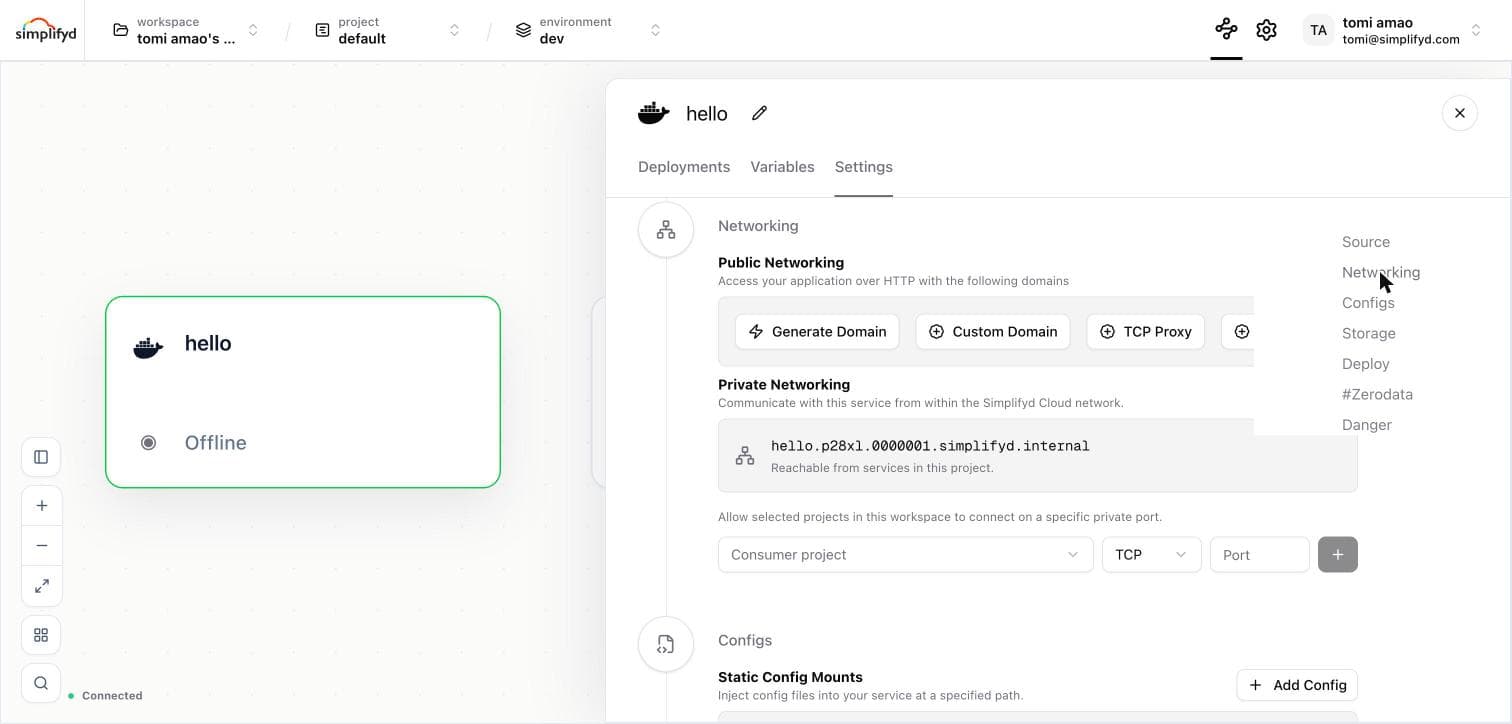
Once the endpoint is active, the public URL or public port appears in the Settings tab.
Protocols
| Protocol | When to use |
|---|---|
| HTTP | REST APIs, web apps, webhooks, or any HTTP/1.1 or HTTP/2 workload |
| gRPC | gRPC services that require HTTP/2 framing |
| TCP | Raw TCP services, databases, brokers, or custom protocols |
| UDP | UDP-based services such as realtime media, game servers, or custom datagram protocols |
HTTP and gRPC endpoints are served over HTTPS/TLS — plain HTTP and plain gRPC are not exposed directly.
TCP and UDP endpoints expose a public port directly. They do not use hostnames, TLS termination, or custom domains.
Automatic TLS
Simplifyd Cloud provisions and renews TLS certificates automatically for HTTP and gRPC ingress endpoints, including custom domains. You do not need to manage certificates or configure certificate authorities.
Assigned domain
When you add an HTTP or gRPC ingress, Simplifyd Cloud assigns a domain of the form:
<service-slug>-<random>.<region>.cloud.simplifyd.comThis domain is available immediately and is also injected into the service as a platform-provided variable:
SIMPLIFYD_PUBLIC_DOMAIN=api-x4k2.eu-west.cloud.simplifyd.comYou can reference this value in other services using a reference variable:
API_URL=https://${{api.SIMPLIFYD_PUBLIC_DOMAIN}}TCP and UDP ports
When you add a TCP or UDP ingress, Simplifyd Cloud assigns a public port instead of a hostname. Use the service's public address and assigned port in your client configuration.
Custom domains are not available for TCP or UDP ingress.
Multiple ingress endpoints
A single service can have more than one ingress — for example, an HTTP endpoint on port 8080 for your REST API, a gRPC endpoint on port 9090, and a TCP endpoint on port 5432. Click Add Ingress again to add further endpoints.
Removing an ingress
- Open the service panel → Settings tab.
- Find the ingress entry and click the trash icon next to it.
- Click Apply to confirm.
The public endpoint is deactivated immediately once the changes are applied.
Removing an ingress does not affect the service itself — the container keeps running. Only external traffic is cut off.

