

Variables
Manage environment variables, shared variables, and reference variables for your services.
Variables provide a way to configure your services and share secrets across a project. They are injected into your containers as environment variables at build and runtime.
Adding, updating, or removing variables results in staged changes. You must click Apply in the Apply Changes bar for the new values to take effect.
Service variables
Variables scoped to an individual service are set from the service panel.
- Click the service node to open the service panel.
- Go to the Variables tab.
- Click New Variable, enter a name and value, and press Add.
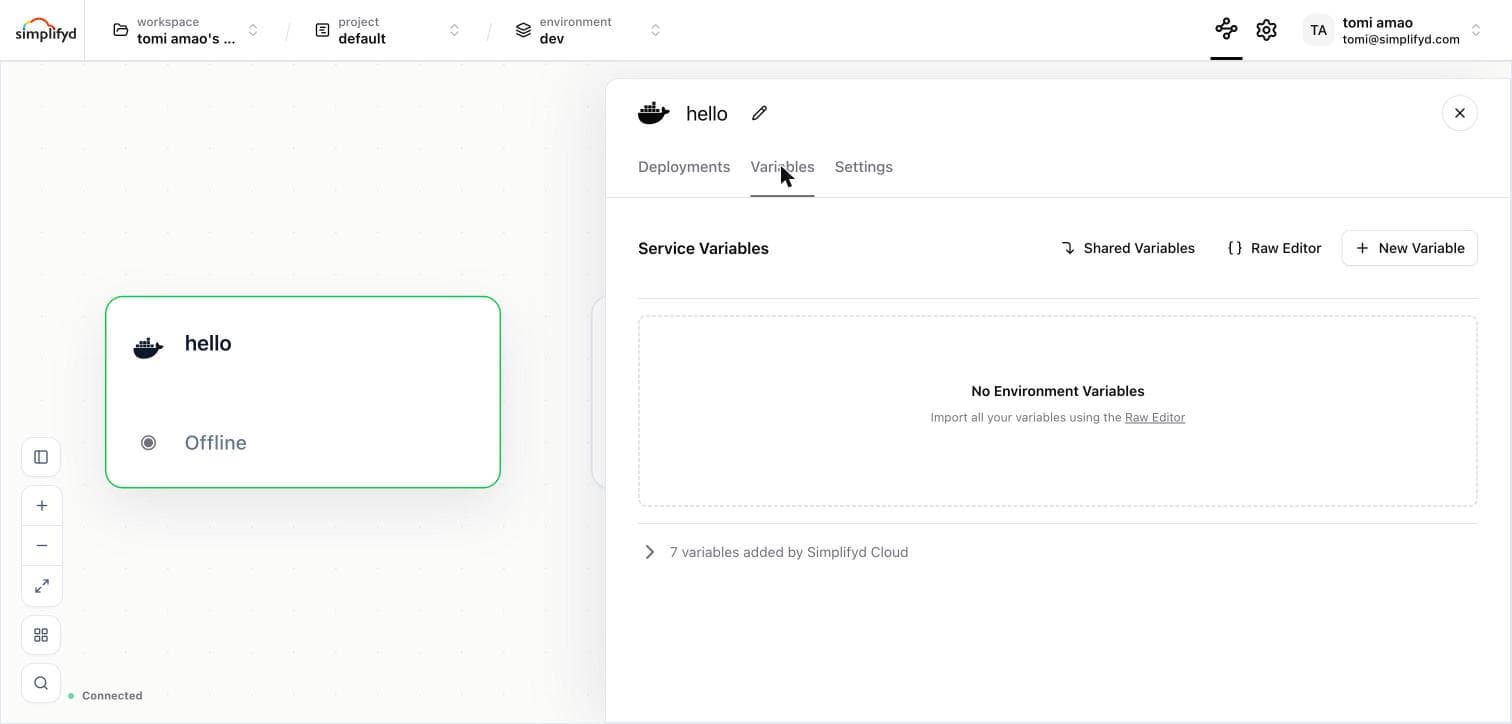
The row at the bottom, "N variables added by Simplifyd Cloud", expands to show the platform-provided variables your service already has.
Raw editor
For bulk imports, click Raw Editor to paste the contents of a .env file directly. Key-value pairs are parsed and added to the service automatically.
Editing and deleting variables
Hover over a variable row to reveal the edit (pencil) and delete (trash) icons. Click the pencil to update the value inline, or click the trash icon to remove the variable.
Shared variables
Shared variables reduce duplication when multiple services need the same value (e.g. an API key or a base URL).
Shared variables are managed from Settings → Shared Variables.
- Choose the environment.
- Enter the variable name and value, then click Add.
Reference variables
Reference variables let you compose values from other variables — including variables in other services, shared variables, and built-in platform variables. References are resolved at deploy time; the running service always receives the final interpolated value.
Simplifyd Cloud uses a ${{...}} template syntax for references.
Reference a variable in the same service
Use the variable name on its own — no namespace needed:
AUTH_ENDPOINT=https://${{BASE_URL}}/${{AUTH_PATH}}Reference a shared variable
Prefix the variable name with shared.:
API_KEY=${{shared.API_KEY}}Reference another service's variable
Use the service name followed by the variable name:
DATABASE_URL=${{postgres.DATABASE_URL}}Where postgres is the name (not the slug) of another service in the same environment.
Managed databases publish some variables you never declared, so you can reference them straight away:
| Service type | Available |
|---|---|
| Postgres | DATABASE_URL, PGHOST, PGPORT, PGUSER, PGPASSWORD, PGDATABASE |
| MySQL | DATABASE_URL, MYSQL_HOST, MYSQL_PORT, MYSQL_USER, MYSQL_PASSWORD |
These are read fresh each time you deploy, so a service picks up a rotated password on its next deployment.
Built-in reference variables
The following variables are always available inside reference expressions:
| Reference | Resolves to |
|---|---|
${{SERVICE}} | The name of the current service |
${{ENVIRONMENT}} | The name of the current environment |
${{PROJECT}} | The slug of the current project |
LOG_PREFIX=${{SERVICE}}-${{ENVIRONMENT}}These built-in reference variables are only available inside ${{...}} expressions. For the environment variables that Simplifyd injects directly into containers at runtime, see Simplifyd-provided variables below.
Autocomplete
The value input field provides live autocomplete as you type ${{. You can also click the {} button at the right edge of the input to insert ${{ at the cursor and open the suggestion list.
| Icon | Suggestion type |
|---|---|
{} | Variable in the same service |
| Globe | Shared variable |
| Lock | Variable from another service |
Start typing a namespace (shared. or a service name) or a variable name to filter results. Use arrow keys to navigate and Enter to select. Press Escape to dismiss.
Once a reference is complete (i.e. the closing }} is present), it is displayed as a highlighted chip inside the input field to make references easy to identify at a glance.
Resolution behaviour
- References are resolved at deploy time. Stored values always contain the raw
${{...}}syntax. - If a referenced variable does not exist, the reference resolves to an empty string.
- Multiple references can appear in a single value:
${{shared.HOST}}:${{PORT}}.
Simplifyd-provided variables
Simplifyd Cloud automatically injects the following variables into every service deployment:
| Variable | Description |
|---|---|
SIMPLIFYD_ENVIRONMENT | The slug of the current environment |
SIMPLIFYD_PROJECT | The slug of the current project |
SIMPLIFYD_SERVICE | The slug of the current service |
SIMPLIFYD_PUBLIC_DOMAIN | The public domain assigned to the service (if ingress is configured) |
SIMPLIFYD_PRIVATE_DOMAIN | The private domain for service-to-service communication within an environment |
These variables are available as own-service variables in reference expressions once the service has been deployed at least once:
API_URL=https://${{SIMPLIFYD_PUBLIC_DOMAIN}}/api
