

Zerodata Proxy
Route traffic to your app so users on supported mobile networks are not charged for data.
Zerodata Proxy is currently in Beta. Features and pricing may change.
A Zerodata Proxy routes traffic to your site through Simplifyd Cloud. Simplifyd has reverse-billing agreements with mobile networks, so the data cost is charged to you instead of to the user's data balance. Your site works for them even with no data left.
Your site can stay wherever it is hosted. Only its DNS record changes.
Supported networks:
| Country | Networks |
|---|---|
| Nigeria | MTN, Airtel, Glo, 9Mobile |
| Kenya | Safaricom |
More networks are being added.
How it works
The Zerodata Proxy sits in front of your origin server. You point your domain's DNS at a Simplifyd-provided CNAME target, and traffic flows through the Zerodata network before being forwarded to your server.
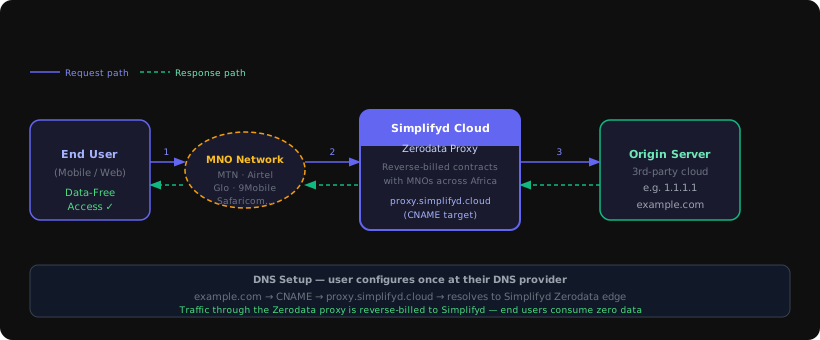
When a user visits your domain:
- Their request enters the Simplifyd network via the MNO's reverse-billed peering point
- The Zerodata Proxy receives the request and forwards it to your origin server
- The response travels back through the same path
- The MNO bills the data cost to Simplifyd, not to the user's data balance
Your origin server does not change. It keeps running wherever it is.
Setup workflow
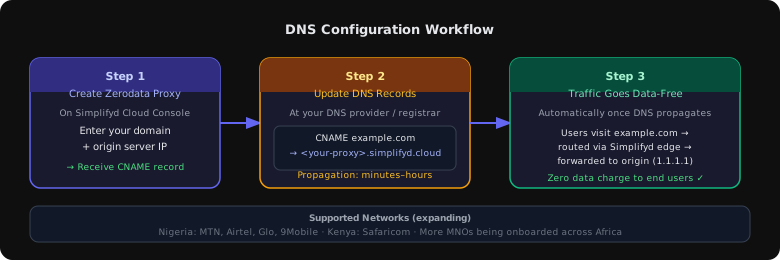
Step 1 — Create a Zerodata Proxy on Simplifyd Cloud
- Open your project on the Simplifyd Cloud Console.
- Navigate to Proxies in the left sidebar.
- Click New Zerodata Proxy.
- Enter your domain name (e.g.
example.com) and your origin server's IP address or hostname (e.g.1.1.1.1). - Click Create.
The CNAME target is this.zerodata.works. It is the same value for every proxy — the Zerodata network routes your traffic by the domain you entered, not by a per-proxy hostname — and the Console shows it on the proxy's Settings tab under DNS Setup.
Step 2 — Update your DNS records
Log in to your DNS provider or domain registrar and create a CNAME record pointing your domain to the Simplifyd target from Step 1:
| Type | Name | Value |
|---|---|---|
CNAME | example.com (or @) | this.zerodata.works |
For a subdomain (e.g. www.example.com):
| Type | Name | Value |
|---|---|---|
CNAME | www | this.zerodata.works |
DNS propagation typically takes a few minutes to a few hours depending on your provider's TTL settings. The proxy status on the Console will update automatically once your DNS record is detected.
Many DNS providers do not allow a CNAME record on the root/apex domain (e.g. example.com itself). If your provider doesn't support CNAME flattening or ALIAS records, use a www subdomain and redirect the apex to www using your registrar's redirect feature.
Step 3 — Verify and go live
Return to the Proxies page on the Simplifyd Cloud Console. Once your DNS change propagates, the proxy status changes to Active. From that point on, traffic to your domain passes through the Simplifyd Zerodata network and your users access your app data-free.
Managing proxies
The Proxies page (left sidebar) lists all Zerodata Proxy instances across your project. Each entry shows:
- Proxy name and slug
- Domain and origin server
- The CNAME target to point your DNS at
- Current status (Pending, Active, or Error)
You can also view and manage a proxy by clicking its node on the project canvas.
Configuration reference
| Field | Description |
|---|---|
| Domain | The domain you own and want to make data-free (e.g. example.com) |
| Origin | The IP address or hostname of your actual server (e.g. 1.1.1.1 or origin.example.com) |
| CNAME target | Read-only. Always this.zerodata.works |
| Status | Pending until DNS propagates; Active once live |
Usage and costs
Data volume passing through the Zerodata Proxy appears as a line item on your Usage page under the Zerodata category. Charges are based on egress volume through the proxy and are billed in your workspace's currency.
Users on the networks listed above are not charged for data when they reach your domain through the proxy.
Deleting a proxy
- Go to Proxies in the left sidebar.
- Find the proxy, click the three-dot menu, and choose Delete.
- Confirm deletion.
After deletion, remember to remove or update the CNAME record at your DNS provider. The target still resolves — it is shared by every proxy — but the Zerodata network no longer has a route for your domain, so requests to it will fail until you point the record elsewhere.

