

Healthchecks
Configure startup, readiness, and liveness healthchecks for safe rolling deployments and automatic recovery of Docker services.
Healthchecks tell Simplifyd Cloud whether your service is alive, ready for traffic, or still starting. A readiness check is what makes zero-downtime deploys possible. Liveness and startup checks restart stuck services and protect slow-starting ones.
Healthchecks are only available on Docker services.
Deployment behaviour
Whether a redeploy causes downtime depends on whether the service has a readiness check:
| Readiness check | How the redeploy runs | What you see |
|---|---|---|
| Configured | Rolling — one new instance starts and has to pass its readiness check before an old instance is removed. | No downtime. The old version keeps serving until the new one is ready. |
| Not configured | Stop-then-start — the old instances stop, then the new ones start. | Downtime while your application boots. |
There is no default readiness check. To get rolling deploys, add one pointing at an endpoint that only returns success when your application can actually serve traffic.
Raising the replica count on its own does not give you a rolling deploy. Without a readiness check, every redeploy causes an interruption.
Check types
There are three types:
| Type | Purpose |
|---|---|
| Startup | Signals that the service has finished initialising. Liveness and readiness checks are disabled until this check succeeds. Use it for slow-starting services. |
| Readiness | Signals that the service is ready to receive traffic. Instances that fail it stop receiving traffic until they pass again. They are not restarted. |
| Liveness | Signals that the service is still running correctly. Services that repeatedly fail this check are restarted automatically. |
When to use each type
- Startup — use when your service takes longer than a few seconds to become operational (e.g. JVM warmup, database migration on boot, loading a large ML model). Without a startup check, a slow-starting service may be killed by the liveness check before it finishes initialising.
- Readiness — use to enable rolling deployments and gate traffic. If your service needs a moment after startup before it can handle requests (e.g. connecting to a database, warming an in-memory cache), a readiness check ensures no requests are routed to it prematurely.
- Liveness — use to detect deadlocks or infinite loops. A service that is running but stuck and not accepting connections will be detected and restarted.
You can configure all three checks on the same service. A typical pattern is: startup → readiness → liveness. A startup check delays readiness and liveness evaluation until startup succeeds.
How healthchecks work
All healthchecks use an HTTP GET request. Simplifyd Cloud sends a GET to the configured path and port on the service. A response with an HTTP status code between 200 and 399 is a success; anything else — including no response or a refused connection — is a failure.
The liveness and readiness checks follow this evaluation cycle:
- Wait
Initial Delayseconds after service start before the first check. - Send an HTTP GET request every
Periodseconds. - Allow each request
Timeoutseconds to respond. - After
Failure Thresholdconsecutive failures → take action (restart for liveness; stop sending traffic, for readiness). - After
Success Thresholdconsecutive successes → mark the check as passing again.
The startup check runs through the same cycle; once it passes for the first time, it stops running and the liveness and readiness checks begin.
Configuring healthchecks
- Open the service panel → Settings tab → Deploy section.
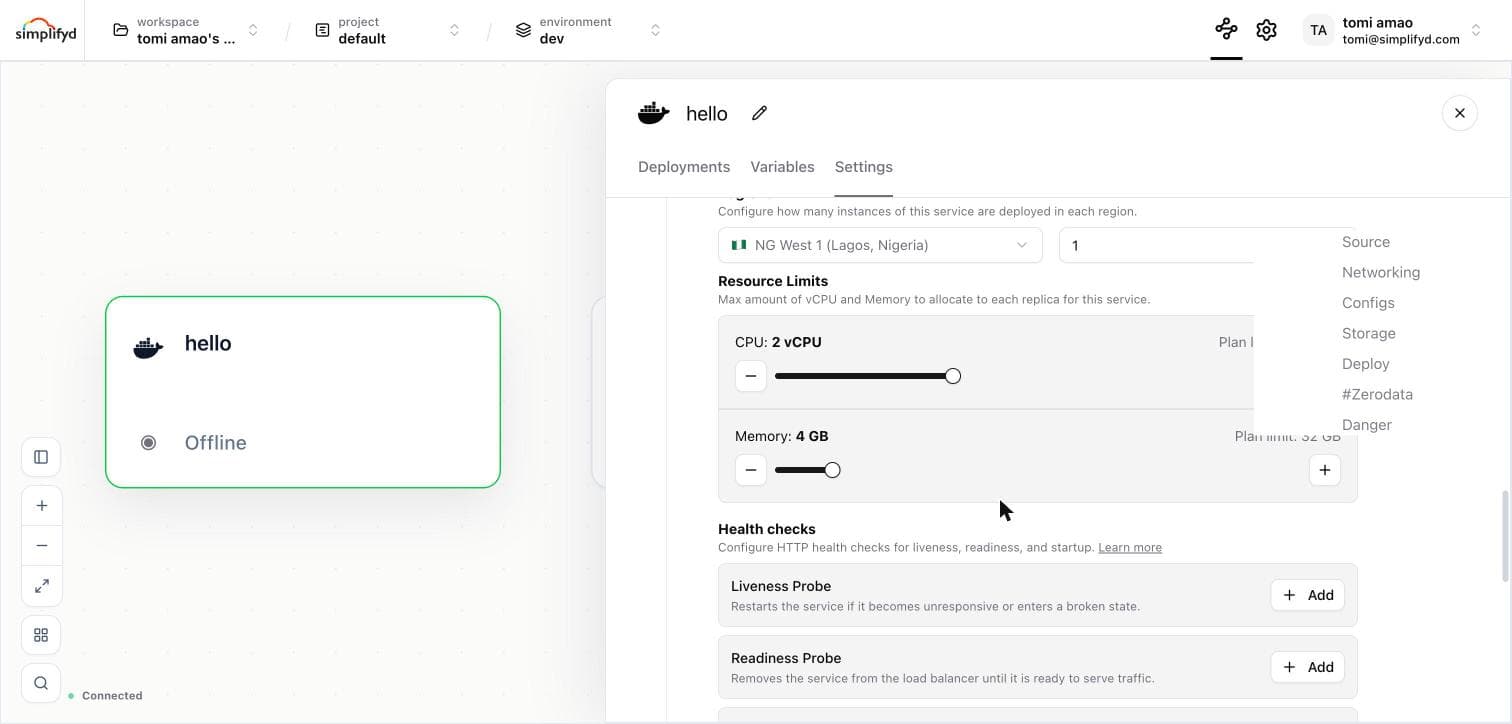
- Find Health checks. Each of Liveness Probe, Readiness Probe, and Startup Probe is listed with its own button.
- Click + Add next to the check you want.
- Fill in the dialog:
- Path — the HTTP path your service exposes for health (e.g.
/health,/ready,/livez). - Port — the port your service is listening on (e.g.
8080).
- Path — the HTTP path your service exposes for health (e.g.
- Optionally expand Advanced settings to configure timing and thresholds (see below).
- Click Save Probe.
- The check is staged as a pending change. Click Apply in the Apply Changes bar to deploy.
Like resource changes and start commands, healthcheck configuration is tracked in the changeset and only takes effect on the next deployment. You can discard the change before deploying.
Advanced settings
| Field | Default | Description |
|---|---|---|
| Initial Delay (s) | 0 | Seconds to wait after the service starts before running the first check. |
| Period (s) | 10 | How often (in seconds) to perform the check. |
| Timeout (s) | 1 | Seconds to wait for a response before counting it as a failure. |
| Failure Threshold | 3 | Number of consecutive failures before the check is considered failed. |
| Success Threshold | 1 | Number of consecutive successes required to mark the check as healthy again after a failure. Must be 1 for liveness and startup checks. |
Editing and removing healthchecks
- Edit — click the pencil icon next to the check to reopen the dialog with the current values pre-filled.
- Remove — click the trash icon next to the check. The removal is staged and applied on the next deployment.
Recommended health endpoint
Your service should expose a lightweight endpoint (e.g. GET /health) that:
- Returns HTTP
200when the service is ready. - Does not make external calls (database, third-party APIs) unless you specifically want those to gate readiness.
- Responds quickly — within the configured timeout (typically 1 second).
A minimal example in Node.js:
app.get('/health', (req, res) => res.sendStatus(200));For a readiness check that also verifies the database is reachable:
app.get('/ready', async (req, res) => {
  try {
    await db.query('SELECT 1');
    res.sendStatus(200);
  } catch {
    res.sendStatus(503);
  }
});
Common patterns
Web app with a slow startup
Use a startup check with a generous window, then readiness and liveness for ongoing health:
| Type | Path | Port | Initial Delay | Period | Failure Threshold |
|---|---|---|---|---|---|
| Startup | /health | 8080 | 0 | 5 | 12 (= 60 s total) |
| Readiness | /health | 8080 | 0 | 10 | 3 |
| Liveness | /health | 8080 | 0 | 30 | 3 |
Minimal setup — traffic gating only
If you only need rolling deployment and traffic gating, a readiness check alone is sufficient:
| Type | Path | Port |
|---|---|---|
| Readiness | /health | 8080 |

